Mobile applications have become a vital component of today’s businesses’ interaction with their customers, provision of services, and ability to provide a seamless digital experience. A good app can help customers engage with a brand and will make it easier for businesses to maintain customer relationships. Ecommerce, banking, healthcare, education, travel, and on-demand services are applications that can help customers engage with the brand and make it easier for businesses to build long-term customer relationships.
Building an app isn’t just about transforming the idea into code, however. Businesses should establish their objectives, get to know their intended audience, decide on their platform and technologies, prepare the mobile app design, figure out the mobile app development price, and choose their mobile app development company or an in-house development team.
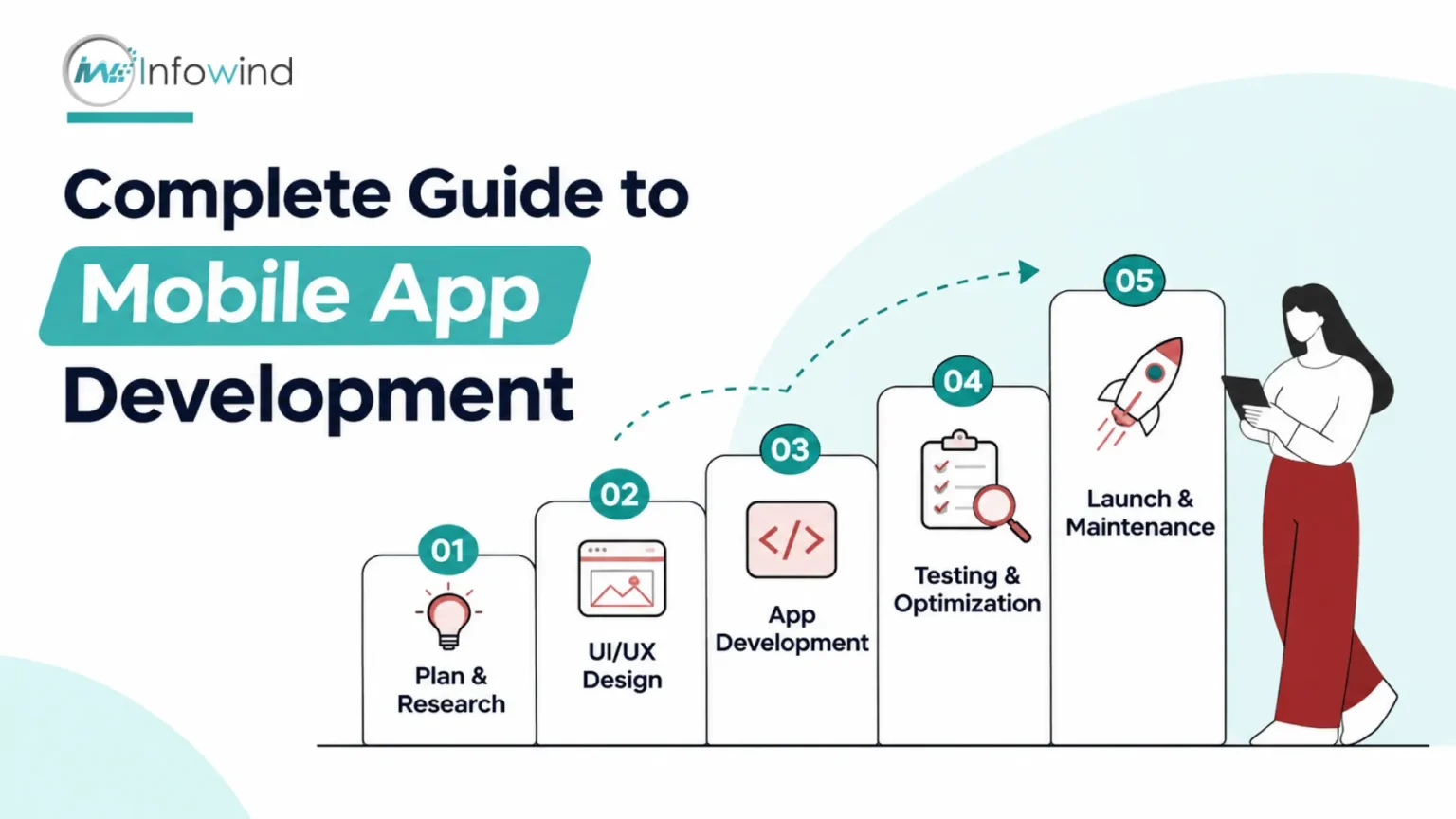
Knowing how to create a mobile application can assist businesses in making these decisions more clearly. The stages of app development encompass planning, market and user research, UI/UX design, app development, testing, deployment, and maintenance.
It explains each step in practical terms to help business owners and decision-makers understand what is involved in success, the timeframe of the process, what factors influence the cost and how to find the right development partner. Whatever your first app idea is, or if you want to launch your existing digital product, the following sections give you a clear path from concept to launch.
Define Your App Idea, Goals, and Target Audience
In order to write a single line of code, a business must define the purpose of the app and for whom it’s designed. A good foundation minimises changes as development proceeds and aids in making the final product useful for a real user.
Identify the Problem Your App Will Solve
First, identify the particular problem you’re trying to solve with your application. Come up with questions like:
- What are the challenges customers are having now?
- What solutions have they found to this problem today?
- What makes an app faster, easier, cheaper, or more convenient?
- Is there a need for the proposed solution?
One such idea could be a restaurant app that would help customers place orders more easily and track delivery times, or a healthcare company’s app that would make appointment scheduling and prescription filling more convenient.
Define Your Business Goals and Objectives
Your app should have a quantifiable business goal. This may be something you want to be able to do in your business, such as increasing sales, building leads, enhancing customer retention, cutting expenses, or developing an additional line of business.
Define success criteria – for example, the number of monthly active users, conversion rate, average order value, retention rate, or in-app revenue. These will impact the development priorities and features of products.
Identify Your Target Audience
Knowing your users is essential to mobile app development for businesses. Identify their demographics, needs, behaviour, technical preferences, and pain points. To validate your assumptions, consider conducting customer interviews, surveys, competitor research, and existing analytics.
Determine Core Features
Do not attempt to include all the capabilities in the initial version. Determine the core functionality required to address the main problem and consider launching it as a minimum viable product (MVP). What this may include could be user registration, search, payments, notifications, booking, messaging, or location services, contingent on the application.
Define Your Unique Value Proposition
Last but not least, explain why users would want to use your app rather than the competition. A good value proposition is the value you offer and the difference you make, clearly and succinctly.
Strategic efforts like these are key in mobile application development and offer a better solution to the question of “how to create a mobile app that will do something meaningful other than just be another app.
Research the Market and Plan Your App
A great idea is just the first step in creating a successful mobile application. Businesses need to do due diligence, study the market, know what customers expect and whether the app is a viable option before investing in design and coding.
Conduct Competitor and Market Research
The first step is to learn to find direct and indirect competition which provides comparable solutions. Check out their features, pricing, app-store ratings, user feedback, strengths and common complaints. Customer reviews can be especially helpful as they offer insight into what customers like and dislike about the products, as well as what they are looking for.
Demand, industry trends and potential barriers to entry should also be studied. It’s not about replicating the competition but finding opportunities to develop a more valuable or distinctive product.
Analyse Customer Needs
Interview, survey, or consult existing customer data to talk to potential users. Identify issues they have, what they want the app to do and what may stop them from using a new app. These insights enable businesses to differentiate between actual needs and assumptions.
Submit App Idea for validation.
Before throwing a ton of money at the idea, try a landing page, clickable prototype, survey or a small pilot. If interest is measured and feedback is gathered early, it can be determined if the proposed solution is meeting a real need.
Define MVP Features
Once you have decided on the concept, the next step in the app development process is to set up the minimum viable product (MVP). Focus on features that are core to the app’s functionality, and delay ancillary features. This way, businesses can get their product up and running earlier, gather feedback from actual users, and make better-bracketed enhancements.
Develop a Development Roadmap
Divide the mobile app development process into distinct steps like research, planning, UX/UI design, development, testing, app launch, and post-launch refinements. Create goals, accountability, timelines, and measures for success for each phase.
Choose the Right Development Approach
The approach to building your mobile app should also be guided by the mobile app development strategy. Native development results in the creation of different apps for platforms like iOS and Android, and can offer high levels of platform-specific performance. Cross-platform development means that the team can create the app for multiple platforms from a single codebase; hybrid development involves using web technologies with a native application wrapper.
The key is to choose the right strategy based on the performance requirements, platforms to be targeted, expertise available, timeline, budget, and long-term maintenance requirements.
Choose the Right Platform, Technology, and Tech Stack
The mobile app development technology selected is a critical business decision as it impacts the performance, scalability, development time, maintenance, and cost of the app. The optimal selection depends on the functionality that the app must perform, and not only on the latest fashions in the field of technology.
iOS vs Android: Which Platform to Build For?
The answer really depends on your target customers, geographical market, device usage and your business goals, as to whether you go with iOS or Android. If your target users are limited to certain markets where there’s a high concentration of iPhones, consider iOS apps, while Android apps offer wider device and market coverage.
Business owners can also debut on one channel first, test the demand and then scale to the other channel according to the data and business needs.
| Consideration | iOS | Android | Cross-Platform |
| Platform coverage | Apple devices | Wide range of device | Multiple platforms |
| Development approach | Platform-specific | Platform-specific | Shared codebase |
| Best suited for | iPhone/iPad-focused audiences | Broad device audiences | Faster multi-platform launches |
| Maintenance | Separate platform focus | Separate platform focus | Often centralized |
Native vs. Cross-Platform Development
Native development focuses on creating an app for each operating system, giving access to more of the operating system’s capabilities and optimisation. Cross-platform app development involves developing the application with a common codebase for multiple platforms, which can save time and effort in duplicate coding and ease maintenance.
This depends on the type of performance required, the features of the device, the period of development, budget and complexity of the user experience.
Plan the Frontend and Backend
The frontend is the part that users interact with: the screens, the navigation, forms, interactive elements, etc. This is where the back end processes data, manages business logic, handles authentication and other functions, as well as communicates with external services.
Typical architecture might also involve APIs to facilitate alignment of the app to backend systems, payment, maps, analytics, CRM or other business software. The size, type, security and frequency of data to be processed by the app should dictate the requirements for the database.
Consider Cloud and Third-Party Integrations
Cloud infrastructure can be used for storage, authentication, databases, notifications, analytics and scaling applications. Third-party integrations can provide payment, maps, communication, customer support, etc., allowing for certain services to be built without having to build them all.
Finally, technology must be driven by the business needs. A customer-service app might require a different stack than, say, a real-time marketplace or a data-heavy enterprise app, for example. The early specification of these requirements helps to build a technology base which can facilitate the launch and growth of the company.
Design the App UI/UX
If users aren’t getting what they need out of the app, it may not be as successful as it could be. The key to good mobile application design is to make all interactions easy, intuitive and helpful. Having a well-designed mobile application user experience can lead to better engagement, a smoother user journey and make people want to come back to the app.
Map the User Flow and Information Architecture
The first step is to define how users will flow through the app. Draw maps of important journeys like creating an account, discovering a product, booking, checking out or customer support. Information Architecture defines the organisation of screens and content to make it easy for users to locate information without having to go through extra steps.
Create Wireframes and Prototypes
Wireframes are used to give a basic visual layout to each screen before detailed design. An interactive prototype can illustrate navigation and important interactions once the basic structure is determined. Making changes to a fully developed application is typically more difficult and costly than testing a prototype application early in the process.
Develop the UI Design
The visual is typography, colours, icons, buttons, spacing, imagery etc. aspects of the interface. A uniform design system ensures a predictable experience throughout the app and a recognisable brand experience.
The need for clarity should be the top priority when designing a mobile UI/UX instead of adding visuals just for the sake of aesthetics.
Prioritise Usability and Accessibility
With minimal instruction, users should be able to know what they should do next. Usability is achieved through clear navigation, readable text, appropriate touch targets, meaningful error messages and logical interactions.
Accessibility should also be thought of from the outset, and this would encompass good contrast, text that can be scaled up or down, accessible labels and suitability for relevant assistive technologies.
Use Responsive Design Principles
When using an app, users should have a similar experience when using the same app on different screen sizes and device orientations (where applicable). The layout, images, text and interactive elements should be responsive and not fixed to a screen size.
Test, Learn, and Refine
User testing can bring to light issues in navigation, confusing screens, and unexpected behaviour that internal teams don’t notice. Gather information from representative users, analyse the interactions and make further improvements before development gets too far.
Good UX is more than just pretty. With tasks completed efficiently and with confidence, there is greater potential for businesses to enhance engagement and retention.
Develop the Mobile App
After the requirements, technology stack and UI/UX are done, the project enters the core mobile application development phase. Here, the approved designs and functionality are then put into action and into a working product. By following a structured approach, development teams can build efficiently, ensuring quality, security, and scalability.
1. Set Up the Development Environment
The development team creates the tools, frameworks, repositories, testing environment and project architecture that are needed. Version Control and separate Development, Testing and Production Environments help manage code changes and minimise impact to the live application.
2. Build the Frontend
The frontend is the user-facing part of the application. The approved UI/UX are then implemented by the developers as functional screens, navigation, forms, animations, and interactions. Implementation shall be consistent with the design but should be modified as needed for various devices and screen sizes.
3. Create Backend and APIs
The backend processes the business logic, security, data manipulation, and interactions with the server-side systems. APIs enable the mobile app to communicate with the backend and external services.
An eCommerce application can, for instance, leverage APIs to fetch product details, handle orders, update stock levels and send payment data back to users.
4. Integrate the Database
The application is linked to an appropriate database that will store and retrieve information such as customer profiles, transactions, preferences, or application content. As the product grows, the database architecture must take into account data volume, performance, reliability, and security.
5. Add Core Features and Integrations
The features that were identified during planning are then put into practice by the developers. They can be anything from registration, search, payment, booking, messaging, notifications, location services, anything business-specific.
Where relevant, third-party services can be included, for example, payment gateways, maps, analytics, cloud services, customer support, authenticator, etc.
6. Integrate Security into Development
Security is not a last-minute job. An effective mobile app development process should involve secure authentication, proper authorisation mechanisms, encrypted data transfers, secure data storage, input validation, dependency control and periodic security assessments.
7. Consider an MVP-First Approach
In many companies, it is better to start with a nominal minimum viable product (MVP) than to begin developing all the features at once. The first one should have the basic functionality that resolves the user problem. Later features and changes can then be made based on real-world feedback.
The systematic approach to app development enables companies to transform their validated designs into a functional product while maintaining the focus on user needs and long-term business goals.
Test, Optimise, and Secure Your App
Prior to reaching customers, an application ought to be tried in realistic situations. A great mobile application test will determine functionality mistakes, usability issues, security weaknesses, and performance problems before they impact end-users. Testing should be done during the development process and not at the end.
Test Functionality and User Experience
Functional testing ensures that essential functions are performed correctly. They can run tests on processes like registration, logon, search, payment, booking, notifications, data sync and more.
The main aim of UI/UX testing is to ensure ease of navigation and usability of the tasks performed by users. It can reveal issues like unclear buttons, broken navigation, inconsistent layouts, or confusing error messages.
Check Performance and Compatibility
Performance testing is a measure of how the app responds to various situations, such as high traffic volume, weak network strength, and data-intensive environments. Teams can track app loading time, app responsiveness, app memory, app battery usage, and crashes.
Compatibility testing is also of vital importance. Evaluation of the app should be done on the appropriate iOS and Android versions, screen sizes, device types, and device hardware based on the target audience. Applications that are successfully run on one device can run differently on another.
Strengthen Mobile App Security
Security testing should be conducted in addition to functionality testing for mobile applications. Security tests may test for authentication, authorisation, data protection, API security, input validation, session management, and vulnerabilities. Sensitive information should be treated as per the security and privacy requirements.
Fix Bugs and Optimise Performance
In general, testing will determine the problems that need to be addressed and prioritised according to severity and impact. The developers are then able to correct the bug, retest the affected functionality and ensure that the changes do not cause any new bugs.
Optimising the performance of an app can involve minimising unnecessary network calls, optimising images and other resources, optimising database queries, optimising memory use, and optimising code that delays the app.
A designed test cycle (test, identify, fix, retest, optimise) helps to build a stable application prior to release. It’s not only about confirming that the app functions as intended, but it’s also about ensuring that it is reliable, secure, and responsive to the devices and conditions that real-life users may encounter.
Launch and Maintain Your Mobile App
Once an app is developed, it does not mean that the development journey is concluded. To ensure the success of a mobile app launch, it is essential to prepare, adhere to the stores’ guidelines, monitor, and make improvements. By incorporating the concept of launch and maintenance within the product life cycle, businesses can better align with what users are doing and the evolving demands of the market.
Prepare for App Store and Google Play Submission
Test the app against the current demands of the stores before release. Create an application listing with name, description, screenshots, app icon, category, privacy information and other necessary information. Prior to submitting the app, it needs to be thoroughly checked for quality and security.
Use a Pre-Launch Checklist
A final checklist can help reduce unnecessary launch problems. Confirm that:
- The core features operate properly.
- Login and payment, notifications, and integrations have been tested.
- Privacy and permission settings are properly set.
- App content and store listings are accurate
- Analytics and crash surveillance are working.
- Customer Support channels are available.
- Production servers and other backend services can cope with the anticipated traffic.
Enhance discoverability through App Store Optimisation
App store optimisation is optimising an app’s visibility and conversion within the app marketplaces. The keywords, descriptions, screenshots, categorisation, and metadata should be relevant, clear, compelling, appropriate, and accurate, so that potential users can get a good idea of what the app is before downloading.
Monitor the App After Launch
When the app is deployed, track crashes, performance, usage, conversion rates, retention, and other metrics. Analytics software can provide insights into areas of pain and most used features.
User feedback is also helpful. Any issues that might not have been seen during testing could be detected through reviews, support requests, surveys and in-app feedback.
Plan Ongoing Maintenance and Improvements
The maintenance for mobile apps involves bug fixes, security patches, dependency updates, support for new OS versions, and backend service and third-party integration maintenance.
Regular updates can also incorporate enhancements as a result of user feedback and business priorities. The new features should be tested with real usage data and customer needs, and not just because they would make the app bigger.
So a mobile app should be conceived as a journey, rather than a finished project which is launched and then forgotten.
How Much Does It Cost and How Long Does It Take to Develop a Mobile App?
The cost of any mobile app development service is different for every business. The price and schedule will rely on the degree of functionality, technical specifications, design difficulty, development method, and team composition of the product. The work for a simple business utility can be quite a bit less than that of a marketplace, financial platform, or real-time application.
What Factors Affect the Cost of Mobile App Development?
Several factors are usually connected and tend to affect the cost of developing a mobile application:
| Factor | Potential impact on cost and timeline |
| App complexity | More complex workflows require more development and testing |
| Number of features | Additional functionality increases development effort |
| Platform selection | Supporting multiple platforms can increase the overall scope |
| UI/UX requirements | Custom interfaces, animations, and complex user flows require additional design work. |
| Backend complexity | Advanced business logic, databases, APIs, and infrastructure add development effort. |
| Third-party integrations | Payments, maps, analytics, CRM, and other integrations require implementation and testing. |
| Development team location | Team rates and availability can vary by region and engagement model |
| Testing & maintenance | Extensive testing, security work, updates, and post-launch support add ongoing costs |
How Long Does It Take to Develop Mobile Apps?
The mobile app development timeline is dependent on the same factors. Each of the following requires time: planning, research, design, development, store submission and post-launch preparation. With a more focused MVP, it’s possible to go through these stages quicker than an app with a lot of features, especially if the first scope is defined.
Rather than just asking “how much will my app cost?”, companies should be intentional about what they need the app to do, on which platforms it should be available, what integrations it should include, how it should look, and how it should be built. The development teams can then have a more realistic estimate of the workload.
A gradual approach will also keep budget and time limits in check. Essential functionality can be released first, observed by users, and then features can be added if proven.
So, an accurate estimate should be determined at the end of the requirements analysis and not at the beginning. This will make the estimated mobile app development cost and timeline more accurate and decrease the risk of any scope creep during the development phase.
Conclusion
Creating a successful mobile application isn’t as easy as creating features and releasing them to the app store. A well-defined process starts with an actual customer need, through research, planning, design, development, testing, launch and continuous improvement.
Knowing how to build a mobile application assists the business in making better decisions throughout the process. Having clear goals and requirements will minimise unnecessary development activities, and selecting technology based on business requirements will provide a better basis for future growth.
Testing is also crucial for uncovering functional, performance, compatibility and security problems prior to and after launch. With the app in use, regular maintenance, updates, monitoring and user feedback ensure that it remains secure, reliable and relevant.
If the business has any kind of complex requirement or less technical expertise, it can be beneficial to engage with a reliable mobile application development partner, who can offer access to an experienced workforce in the strategy, UI/UX, development, testing, deployment, and maintenance of mobile applications.
Finally, the best app projects are not just about building the app; they’re about addressing the user’s needs, business goals, technology, budget, and scalability.