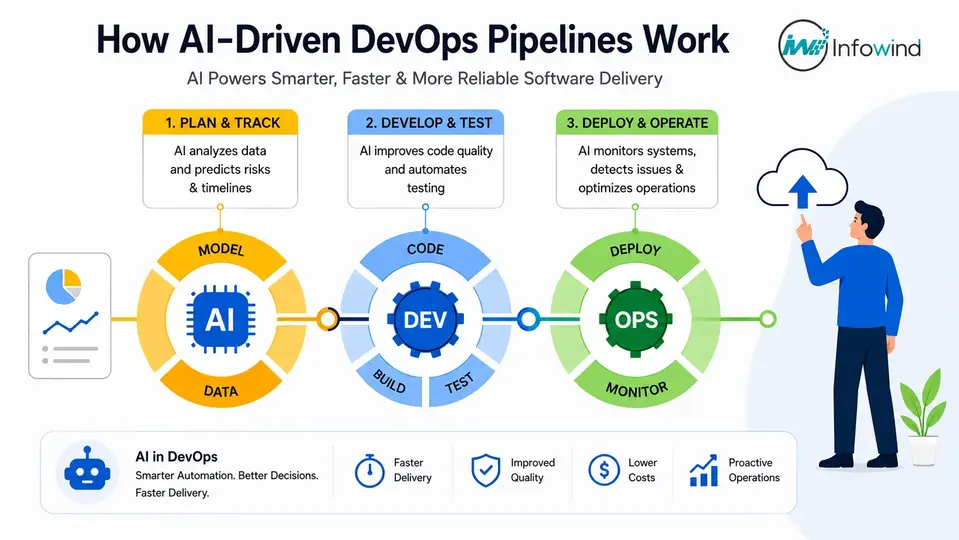
Modern software development demands frequent releases, high reliability, and continuous innovation. While DevOps and CI/CD have transformed software delivery, the shift to complex, cloud-native architectures has exposed challenges such as manual monitoring, deployment failures, and delayed incident resolution. AI-powered DevOps addresses these issues. According to the DORA 2024 DevOps Report, high-performing teams achieve faster deployments and more stable releases. Gartner projects that by 2027, 80% of enterprises will use AI-augmented software testing tools.
The incorporation of AI into DevOps processes can streamline repetitive tasks and forecast failures, ultimately enhancing software delivery and providing organisations with a more accurate picture. In this guide, you will discover what an AI-Powered DevOps Pipeline is, the major advantages it offers, and how collaborating with an AI DevOps development company can speed up digital transformation. This guide will help you, as a CTO, DevOps Engineer, Software Architect, Engineering Manager, or Developer, to create smarter DevOps processes.
What Is an AI-Powered DevOps Pipeline?
Organisations need more than traditional automation in a more distributed software system, with shorter release cycles. AI-Powered DevOps Pipeline is a new paradigm in DevOps that marries AI and machine learning capabilities with DevOps principles and practices to automate decision-making, predict failures, optimise deployments, and enhance software quality. AI isn’t just about following a set of rules; it’s about continuously learning from past and current information to optimise DevOps workflows for speed, intelligence, and reliability.
What Is DevOps?
DevOps is a software development approach that integrates development (Dev) and operations (Ops) teams to improve software development processes. It focuses on collaboration, automation, continuous integration, continuous delivery (CI/CD), and continuous feedback, all while ensuring the creation of high-quality software on time.
DORA’s 2024 DevOps Accelerate Report finds that all organisations with mature DevOps practices have better deployment performance and improved system stability compared to lower-performing teams.
What is a DevOps Pipeline?
DevOps pipeline is the automatic process of transferring code from development to production while passing through different stages like planning, coding, building, testing, deployment, monitoring, feedback, etc.
It reduces manual involvement, decreases deployment mistakes, and allows teams to deploy frequently without compromising software quality.
How is a DevOps Pipeline “AI-Powered”?
An AI-Powered DevOps Pipeline enhances every stage of the traditional pipeline by leveraging AI and machine learning. It can detect anomalies, foresee infrastructure failures, create test cases, pinpoint security risks, optimise cloud resources, and propose deployment strategies based on historical patterns.
Smart automation can save engineering teams from a significant amount of downtime, increase software release confidence, and speed up software delivery.
Traditional DevOps vs AI-Powered DevOps
| Capability | Traditional DevOps | AI-Powered DevOps |
| Monitoring | Manual dashboards and alerts | Predictive monitoring with anomaly detection |
| Testing | Script-based, manually maintained | AI-generated and self-healing test cases |
| Deployment | Fixed deployment rules | Risk-aware deployments based on AI predictions |
| Troubleshooting | Manual log analysis | AI-powered root cause analysis in minutes |
| Infrastructure Scaling | Reactive auto-scaling | Predictive scaling based on usage trends |
| Incident Detection | Alerts after failures occur | Early detection before users are affected |
| Resource Optimization | Manual cloud resource allocation | AI-driven infrastructure optimisation that can reduce cloud costs |
| Release Decisions | Human-driven approvals | AI-assisted deployment recommendations using historical success data |
| Mean Time to Resolution (MTTR) | Often measured in hours | Can be significantly reduced through automated diagnostics |
| Decision Making | Rule-based automation | Data-driven, continuously learning intelligence |
Why Modern Engineering Teams Are Adopting AI in DevOps
The complexity of software ecosystems is increasing, and engineering leaders are welcoming AI-powered DevOps Services to boost speed, reliability, and efficiency. Intelligent automation and data-driven decision-making can help organisations construct resilient software delivery pipelines, while also cutting down the manual effort and operational expenses.
Growing Software Complexity
Applications in the modern world are typically deployed on a multitude of Microservices, containers, Kubernetes, cloud providers, and distributed systems. It is no longer practical to manage thousands of deployments, logs, and dependencies by hand. AI can be used to sift through vast amounts of information from operations to find anomalies or identify problems before they affect users.
Faster Release Cycles
Customers want updates and progress on features. In the 2024 DORA Accelerate Report, high-performing engineering teams deploy code much more often and have lower failure rates of changes. An AI-Powered DevOps Pipeline speeds up software delivery by reducing testing and deployment time, validation, and release decisions, which eventually results in faster and more reliable software delivery.
Cloud-Native Applications
Cloud-based systems are dynamic, making for more difficult infrastructure management. By constantly tracking workloads, forecasting resource needs, and optimising cloud resource use, AI helps businesses maximise application performance and minimise infrastructure waste. This is a feature that a growing number of DevOps automation service providers are offering.
Developer Productivity
Developers invest time in activities such as logging, debugging, writing test cases, and analysing incidents, etc., that are repetitive. AI can automate these tasks, enabling engineering teams to dedicate their efforts to innovation rather than repetitive maintenance. That’s why more and more organisations are looking to hire AI developers to take advantage of intelligent automation in their DevOps processes.
Cost Optimization
Unplanned downtime and sub-optimal workload utilisation can add up to high costs in the cloud. AI algorithms forecast the scale requirements of the growing environment, automatically remediate as needed, and intelligently allocate resources to achieve better utilisation and lower infrastructure costs. By enabling more efficient production operations and reducing production incidents, AI-driven processes can result in significant cost savings, industry experts project.
Improved Reliability
By leveraging AI’s predictive monitoring, real-time anomaly detection, and automated root cause analysis capabilities, these tools improve systems’ reliability. Rather than responding to failures, teams can take proactive measures to prevent them, thereby enhancing service availability and customer experience. With the increasing pace of adoption, collaborating with an experienced artificial intelligence (AI) DevOps development firm or AI software development service is the way to modernise engineering tasks and create scalable, future-ready software supply chains.
AI-Powered DevOps Pipeline Architecture
An AI-Powered DevOps Pipeline enhances every stage of the software delivery lifecycle with intelligent automation, predictive analytics, and continuous learning. AI can learn from past data, code modifications, infrastructure metrics, and user activity to enhance decision-making in the planning-to-production lifecycle, rather than just relying on predesigned rules. The result is quicker releases, fewer failures, and increased efficiency in systems’ operation.
Pipeline Flow:
Planning → Development → Version Control → Continuous Integration (CI) → Testing → Security (DevSecOps) → Continuous Deployment (CD) → Monitoring → Feedback & Optimization
Planning Layer:
Effective planning is vital to every successful project. By analysing past project data, team velocity, and delivery patterns, AI assists engineering teams in making informed decisions about sprints.
AI Capabilities
- Predicting a sprint’s performance based on past sprints.
- Intelligent backlog prioritisation
- The formula for estimating effort for user stories.
- Resource allocation recommendations
- Delivery risk forecasting
Business Impact: Improved sprint planning, better predictability, and fewer delays in the project.
Development Layer
With the introduction of AI, developers can write code, review it, and maintain it more efficiently, freeing up time for more complex problem-solving.AI is changing the way that developers write, review, and maintain code, enabling them to spend less time on repetitive tasks and more on complex problem-solving.
AI Capabilities
- AI coding assistants
- Intelligent code completion
- Automated documentation generation
- Code quality recommendations
- Refactoring suggestions
Business Impact: Improved developer productivity, reduced coding mistakes, and quicker feature development.
Version Control Layer
AI can enhance the capabilities of version control platforms like GitHub, GitLab, and Bitbucket, making them smarter and more efficient in collaboration and code review.
AI Capabilities
- Smart commit message suggestions
- Describe the change in a PR in an automated summary
- Code review recommendations
- Change impact analysis
- Merge conflict prediction
Business Impact: Accelerated code review and better collaboration between engineering teams.
Continuous Integration (CI) Layer
Continuous Integration validates every change of code change before moving on to the pipeline. AI decreases unnecessary builds and increases pipeline efficiency.
Popular CI Tools
- Jenkins
- GitHub Actions
- GitLab CI
AI Capabilities
- Build failure prediction
- Dependency optimization
- Pipeline performance analysis
- Intelligent build prioritisation
- Automated pipeline optimization
Business Impact: quicker build times, fewer failures, and more efficient CI pipelines.
Testing Layer
The test phase of a software release is one of the most resource-consuming processes. AI has a profound impact on testing speed, accuracy, and coverage.
AI Capabilities
- Generate test cases automatically.
- Intelligent regression testing
- Visual UI testing
- Smart test selection
- Defect prediction
Business Impact: Easier releases, better software, and less testing time.
Security Layer (DevSecOps)
Security is not just an afterthought. AI embeds security into the development process, providing proactive threat detection and compliance.
AI Capabilities
- Secret & credential detection
- Vulnerability scanning
- Dependency risk analysis
- Compliance automation
- Security policy recommendations
Business Impact: Decreased security risk, quicker remediation and better compliance throughout pipelines.
Continuous Deployment (CD) Layer
AI can be used to analyse the risks of deployment before the code is deployed to production, enabling teams to deploy software with greater confidence.
AI Capabilities
- Canary deployment recommendations
- Intelligent deployment scheduling
- Rollback prediction
- Release risk assessment
- Deployment health validation
Business impact: Safer deployment, less downtime and a better success rate in releases.
Monitoring Layer
Thousands of alerts are generated every day with traditional monitoring. AI leverages real-time data to uncover patterns that might not be discernible to humans, providing valuable insights to drive action.
AI Capabilities
- Intelligent log analysis
- Automated RCA
- Incident prediction
- Capacity planning
- Performance anomaly detection
Business Impact: Quick resolution of incidents, reduction in MTTR and increased application availability.
Feedback & Optimisation Layer
The final stage is to continuously learn from the data during production to make improvements to the next release, which closes the DevOps loop.
AI Capabilities
- Engineering performance analytics
- Developer productivity insights
- Customer behavior analysis
- Release performance tracking
- Continuous pipeline optimization
Business impact: Data-driven decision-making, ongoing improvement, and improved engineering efficiency.
What is the significance of this architecture?
An AI-Powered DevOps Pipeline is unlike traditional pipelines, which automate pre-defined tasks; it continuously learns from code, infrastructure, deployment, and production data to optimise all software delivery stages. By using this smart method, organisations can deliver software quicker, cut down on operational risks, and scale efficiently.
This has led to the growing trend of businesses collaborating with an AI DevOps development company to integrate cutting-edge DevOps automation solutions, thereby enhancing developer productivity, bolstering software quality, and driving digital transformation.
Step-by-Step: Building an AI-Powered DevOps Pipeline
Creating an AI-Powered DevOps Pipeline is not a trivial task of just integrating an AI tool into an existing CI/CD pipeline. The objective is to achieve an intelligent software delivery system: automation, security, testing, deployment, and monitoring collaboratively. The following 10-step process is a practical process for engineering teams.
Step 1: Project Planning
The initial step is to establish the goals, architecture, deployment environment, compliance rules, and anticipated release frequency of the application. Determine tasks in DevOps that can be automated with AI and have ROI.
Focus on:
- Release goals and KPIs
- Team responsibilities
- Cloud and infrastructure requirements
- Security and compliance needs
- AI automation opportunities
Tip: Set measurable baselines including deployment frequency, lead time for changes, change failure rate, and MTTR before you roll out AI.
Step 2: Repository Setup
Use a source code repository like GitHub, GitLab, or Bitbucket that supports collaboration. Create a clean branching strategy and repository design first, and then add automation.
Define:
- Branching and merge policies.
- Repository permissions
- Code ownership rules
- Environment configurations
- Secrets management
A structured repository provides AI tools and automation processes with a consistent context.
Step 3: Set up Version Control
Integrate with your source tree management system and enable automatic code change validation for any significant change in the code.
Configure:
- Pull request workflows
- Automated code reviews
- Commit standards
- Branch protection
- Change tracking
AI can also help with PR summaries, commit suggestions, code review recommendations, and change impact analysis, minimising friction for the development teams.
Step 4: Add an AI Coding Assistant
AI coding assistants can assist developers with code generation, documentation, explanation of code, and code suggestions, helping them with the implementation process.
Popular options include:
- GitHub Copilot
- Amazon Q Developer
- Gemini Code Assist
But AI-generated code should be reviewed by humans, tested automatically, screened for security vulnerabilities, and conformed to engineering standards.
Step 5: Automate continuous integration
Then, create the CI layer with Jenkins, GitHub Actions, or GitLab CI. Set up automated builds, dependency checks, unit tests, and quality gates for all applicable code changes.
AI can be used to improve CI by detecting common build failures, maximising dependency use, prioritising changes that are likely to cause problems, and understanding common pipeline errors.
Step 6: Integrate AI Testing
Intelligent automation can provide massive efficiency benefits in testing. Use AI-driven testing to create test cases that are relevant to the code change and help determine if any tests should be conducted after a specific code change.
Consider:
- AI-generated test cases
- Regression testing
- Visual testing
- Intelligent test selection
- Defect prediction
The goal is to conduct the right tests at the appropriate time.
Step 7: Implement DevSecOps
Security measures should be built into the pipeline process, and not just after production is deployed.
Implement automated:
- Secret detection
- Vulnerability scanning
- Dependency analysis
- Static application security testing
- Compliance checks
AI can be used to prioritise vulnerabilities based on their potential impact on the business, which can help to alleviate the security-alert overload and prioritise the most critical vulnerabilities first.
Step 8: Automate Deployment
Integrate the verified build into your Continuous Delivery/Deployment Build System. Employ automated deployment (e.g., blue-green or canary deployments) as needed.
AI can consider deployment signals and suggest:
- Deployment timing
- Canary traffic levels
- Release risk
- Rollback decisions
This provides a more risk-aware deployment process rather than a rigid, rules-based deployment process.
Step 9: Enable AI Monitoring
After the application goes into production, link application logs, metrics, traces, infrastructure data, and deployment data to your observability platform.
AI monitoring can detect:
- Unusual performance patterns
- Infrastructure anomalies
- Potential incidents
- Capacity requirements
- Possible root causes
This enables teams to switch from reactive monitoring to predictive operations and identify issues before they turn into customer-facing incidents.
Step 10: Continuous Optimisation
An AI pipeline should be able to continuously learn from its own performance. Monitor regularly deployment results, failed builds, incidents, testing results, cloud usage, and developer feedback.
Track metrics such as:
| Metric | What It Reveals |
| Deployment frequency | How often teams release |
| Lead time for changes | How quickly code reaches production |
| Change failure rate | Release reliability |
| MTTR | Speed of incident recovery |
| Pipeline duration | CI/CD efficiency |
| Test failure rate | Software quality trends |
| Cloud utilization | Infrastructure efficiency |
It’s important to use AI as a tool for your DevOps journey, and not as a standalone solution. Those without the expertise can outsource the process to an AI developer or an AI DevOps development company to design, integrate, and continually improve the pipeline based on their technology stack and business goals.
Best AI Tools for Building DevOps Pipelines
No single tool can create an entire AI-powered DevOps pipeline. The more common components of modern engineering teams are source control, CI/CD, AI coding, security, observability, incident management, infrastructure automation, and orchestration.
The choice is dependent upon your current environment, application designs, compliance needs, team size, and cloud environment. Popular options are compared below, and the difference in where each tool fits into an AI-Powered DevOps Pipeline is highlighted.
| Tool | Category | Best For | *Pricing ** | AI Features / Intelligent Capabilities |
| GitHub Copilot | AI Coding Assistant | AI-assisted development | Free; Pro from $10/user/month; Business $19/user/month; Enterprise $39/user/month | Code completion, chat, code review, agents, coding assistance |
| GitHub Actions | CI/CD | GitHub-based automation | Free allowances; paid usage beyond included quotas | Workflow automation, AI-assisted development integrations, automated CI/CD |
| GitLab Duo | AI DevSecOps | AI across the software lifecycle | Plan-dependent; contact GitLab for current pricing | AI-assisted coding, code explanation, summaries, review, DevSecOps assistance |
| Jenkins | CI/CD Automation | Highly customizable pipelines | Free & open source | Plugin ecosystem and integrations can add AI capabilities |
| Azure DevOps | DevOps Platform | Enterprise software delivery | Basic from $6/user/month; additional services usage-based | AI-assisted development integrations, GitHub Copilot integration, automated pipelines |
| Amazon Q Developer | AI Coding & Cloud Assistant | AWS-centric development | Free tier; Pro $19/user/month | Agentic coding, code transformation, AWS assistance, troubleshooting |
| Dynatrace | Observability & AIOps | Enterprise monitoring | From $7/month per host for Foundation; usage varies by capability | Davis AI, anomaly detection, automated root-cause analysis, predictive insights |
| Datadog | Observability & AIOps | Cloud monitoring and operations | Infrastructure Pro from $15/host/month annually | Watchdog, anomaly detection, intelligent monitoring, incident insights |
| New Relic | Observability | Full-stack application monitoring | Free tier includes 100 GB/month; paid usage-based plans | New Relic AI, AIOps, automated analysis, application intelligence |
| PagerDuty | Incident Management & AIOps | Incident response and automation | AIOps from $699/month | ML-based noise reduction, AI-assisted triage, automation, incident intelligence |
| SonarQube | Code Quality & Security | Continuous code analysis | Free and paid editions | AI CodeFix, AI-generated remediation suggestions, code quality analysis |
| Snyk | Application Security | Developer-first AppSec | Free; Team from $25/developer/month | AI-assisted security workflows, vulnerability prioritisation, code and dependency analysis |
| Harness | CI/CD & DevOps Platform | Enterprise delivery automation | Free tier; paid plans are usage/module based | AI-powered deployment verification, automated rollbacks, Harness AI |
| Terraform | Infrastructure as Code | Cloud infrastructure automation | Free and paid HCP Terraform plans | Infrastructure automation, cost estimation, policy automation |
| Kubernetes | Container Orchestration | Containerized workloads | Free & open source; infrastructure costs vary | Automated scheduling, scaling, self-healing, extensible AI/ML integrations |
Product capabilities and pricing are subject to change. The prices listed are indicative only, based on official vendor data and subject to change based on plan, usage, region, contract, and/or billing commitment. Copilot Business is currently $19/user/month, and Enterprise is $39/user/month on GitHub; Amazon Q Developer Pro is $19/user/month, and Datadog’s Infrastructure Pro is $15/host/month, billed annually.
How to Choose the Right AI DevOps Tools
The highest-quality stack isn’t always the one that has the most AI capabilities. It’s the one that seamlessly fits into your current development process and brings tangible benefits to deployment frequency, lead time, reliability, security, and developer productivity.
For example:
- AI tools for development: GitHub Copilot or Amazon Q Developer can speed up coding and software engineering processes.
- For CI/CD: GitHub Actions, Jenkins, Azure DevOps, GitLab, or Harness can automate builds, testing, and deployments. There is built-in usage of GitHub Actions, and any extra usage of the hosted runners is charged by the type of runner.
- Observability and AIOps: Dynatrace, Datadog, and New Relic can offer intelligent monitoring, anomaly detection, and operational insights. For example, automated root-cause analysis is part of Dynatrace’s Full-Stack Monitoring solution.
- For security: SonarQube and Snyk can be integrated into the development lifecycle with security and code-quality checks. SonarQube Cloud’s AI CodeFix can suggest fixes for problems that are eligible for it, and Snyk offers SCA, SAST, IaC, and container security features.
- For incident management: PagerDuty enhances operations workflows with ML-based noise reduction, contextual triage, and automation.
- For infrastructure: Terraform and Kubernetes are the foundation of repeatable infrastructure provisioning and orchestration of containers. HCP Terraform is available in free and paid tiers and is priced based on cloud service usage.
A Practical AI-powered DevOps Stack
In a typical modern engineering organisation, this could be a combination of GitHub + GitHub Copilot + GitHub Actions + AI-powered testing + Snyk/SonarQube + Terraform + Kubernetes + Datadog/Dynatrace + PagerDuty.
It’s all about the integration. An AI DevOps development company can assist organisations in assessing these tools, integrating them into a cohesive workflow, and figuring out which areas of AI automation will be more useful than acquiring yet another off-the-shelf solution.
For organisations lacking the necessary expertise in-house, outsourcing to AI Developers can also be instrumental in developing custom AI agents, automation workflows, and intelligent DevOps capabilities that leverage the existing technology stack.